
Eclipse中编写MapReduce程序和SQL

MapReduce编程
步骤1:创建Maven项目
在Eclipse中,选择File > New > Maven Project,填写项目的基本信息,如GroupId、ArtifactId等,点击Finish完成项目创建。
步骤2:添加依赖
在项目的pom.xml文件中,添加Hadoop MapReduce的依赖。
<dependencies>
    <dependency>
        <groupId>org.apache.hadoop</groupId>
        <artifactId>hadoopmapreduceclientcore</artifactId>
        <version>3.3.1</version>
    </dependency>
</dependencies>
步骤3:编写Mapper类
创建一个名为WordCountMapper的Java类,并实现Mapper接口。
import java.io.IOException;
import org.apache.hadoop.io.IntWritable;
import org.apache.hadoop.io.LongWritable;
import org.apache.hadoop.io.Text;
import org.apache.hadoop.mapreduce.Mapper;
public class WordCountMapper extends Mapper<LongWritable, Text, Text, IntWritable> {
    private final static IntWritable one = new IntWritable(1);
    private Text word = new Text();
    public void map(LongWritable key, Text value, Context context) throws IOException, InterruptedException {
        String[] words = value.toString().split("\s+");
        for (String w : words) {
            word.set(w);
            context.write(word, one);
        }
    }
}
步骤4:编写Reducer类
创建一个名为WordCountReducer的Java类,并实现Reducer接口。
import java.io.IOException;
import org.apache.hadoop.io.IntWritable;
import org.apache.hadoop.io.Text;
import org.apache.hadoop.mapreduce.Reducer;
public class WordCountReducer extends Reducer<Text, IntWritable, Text, IntWritable> {
    public void reduce(Text key, Iterable<IntWritable> values, Context context) throws IOException, InterruptedException {
        int sum = 0;
        for (IntWritable val : values) {
            sum += val.get();
        }
        context.write(key, new IntWritable(sum));
    }
}
步骤5:配置Driver类
创建一个名为WordCountDriver的Java类,用于配置和运行MapReduce作业。
import org.apache.hadoop.conf.Configuration;
import org.apache.hadoop.fs.Path;
import org.apache.hadoop.io.IntWritable;
import org.apache.hadoop.io.Text;
import org.apache.hadoop.mapreduce.Job;
import org.apache.hadoop.mapreduce.lib.input.FileInputFormat;
import org.apache.hadoop.mapreduce.lib.output.FileOutputFormat;
public class WordCountDriver {
    public static void main(String[] args) throws Exception {
        Configuration conf = new Configuration();
        Job job = Job.getInstance(conf, "word count");
        job.setJarByClass(WordCountDriver.class);
        job.setMapperClass(WordCountMapper.class);
        job.setCombinerClass(WordCountReducer.class);
        job.setReducerClass(WordCountReducer.class);
        job.setOutputKeyClass(Text.class);
        job.setOutputValueClass(IntWritable.class);
        FileInputFormat.addInputPath(job, new Path(args[0]));
        FileOutputFormat.setOutputPath(job, new Path(args[1]));
        System.exit(job.waitForCompletion(true) ? 0 : 1);
    }
}
SQL编程
步骤1:创建数据库连接
需要导入JDBC驱动,然后使用DriverManager类创建数据库连接。
import java.sql.Connection;
import java.sql.DriverManager;
import java.sql.SQLException;
public class DatabaseConnection {
    public static Connection getConnection() {
        Connection connection = null;
        try {
            Class.forName("com.mysql.jdbc.Driver");
            connection = DriverManager.getConnection("jdbc:mysql://localhost:3306/mydatabase", "username", "password");
        } catch (ClassNotFoundException | SQLException e) {
            e.printStackTrace();
        }
        return connection;
    }
}
步骤2:执行SQL查询
使用Statement或PreparedStatement对象执行SQL查询。
import java.sql.Connection;
import java.sql.ResultSet;
import java.sql.SQLException;
import java.sql.Statement;
public class ExecuteSQL {
    public static void main(String[] args) {
        Connection connection = DatabaseConnection.getConnection();
        try {
            Statement statement = connection.createStatement();
            ResultSet resultSet = statement.executeQuery("SELECT * FROM mytable");
            while (resultSet.next()) {
                System.out.println(resultSet.getString("column_name"));
            }
        } catch (SQLException e) {
            e.printStackTrace();
        } finally {
            try {
                connection.close();
            } catch (SQLException e) {
                e.printStackTrace();
            }
        }
    }
}
相关问题与解答
问题1:如何在Eclipse中设置Hadoop环境?
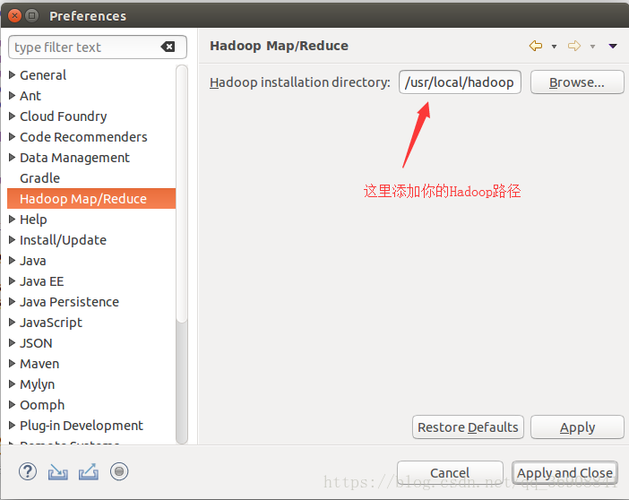
答案1: 在Eclipse中设置Hadoop环境,需要进行以下步骤:
1、下载并安装Hadoop。
2、将Hadoop的安装路径添加到系统的环境变量中。
3、在Eclipse中,右键点击项目 > Build Path > Configure Build Path。
4、在弹出的窗口中,选择Libraries选项卡,然后点击Add Library。
5、选择User Library,然后点击Next。
6、点击User Libraries…按钮,创建一个新的库,命名为Hadoop,并将Hadoop的jar文件添加到该库中。
7、确认并应用更改。
问题2:如何优化MapReduce程序的性能?
答案2: 优化MapReduce程序的性能可以从以下几个方面入手:
1、数据分区策略:合理设置分区数可以提高并行度,但过多的分区可能导致任务调度开销增大,可以通过调整mapreduce.job.reduces参数来设置分区数。
2、Combiner的使用:在Map阶段后使用Combiner可以减少网络传输的数据量,提高整体性能,对于一些可以局部聚合的操作,可以考虑使用Combiner。
3、数据压缩:开启MapReduce作业的数据压缩功能可以减少磁盘I/O操作,从而提高性能,可以通过设置mapreduce.map.output.compress和mapreduce.output.fileoutputformat.compress参数来实现。
4、避免不必要的数据传输:尽量减少Map和Reduce之间的数据传输量,例如通过本地化处理数据或者使用更高效的序列化格式。
【版权声明】:本站所有内容均来自网络,若无意侵犯到您的权利,请及时与我们联系将尽快删除相关内容!


发表回复